Samurai Warriors 4 was released by Tecmo Koei for the PS3 and PS Vita on March 20, 2014, with a PS4 version following on September 4. North America got a simultaneous release on all three systems on October 21, 2014. This review was done utilising the PS4 version.
I'd like to make a small disclaimer for this review. Since it follows so closely after my previous review of Warriors Orochi 3, also for the PS4, I plan to make direct comparisons to the two games, since they are different forms of the same game.
For veterans of the Warriors franchise, the menus look fundamentally identical to every other game in the series. When booting up you are treated to a skippable introduction cutscene, and when you get to the main menu you see almost the same menu as any other Warriors game. At the top is the Story Mode selection, then Chronicle Mode, which allows you to replay maps at will once the are unlocked. Following that is the Free Mode, a mode I'll cover more in depth below. The last two selections are the Dojo and the Options. Dojo allows you to manage save data and create your own characters, which you use later in the Free Mode.
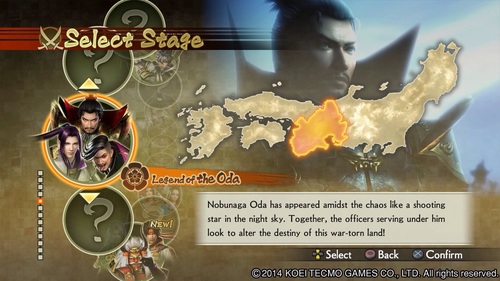
When you choose either Story or Chronicle Mode, you're treated to the screen to the right. There are thirteen different stages you can choose from, ranging from the one shown to others across the country of Japan, chronicling the history of the Warring States period. Some liberties are taken with history, as is par for the course with Warriors game, but the overarching story follows history fairly closely. Indeed, some stages require you to complete previously unlocked stages, so the history contained within the game seems to be fairly accurate.
When you choose a battlefield within a stage, you are treated to first the character select screen - where you choose a primary and secondary character - and then the battlefield info screen, where you can change weapons and items and get the overall lay of the land before you're thrown into battle. One difference of note in this game is that the items you choose no longer appear to permanently alter your stats like other Warriors games; instead, they act as temporary buffs that you can activate within combat - some items restore health, while others increase your attack or defense for a short period of time. This makes each item useful, as opposed to previous games where you could get by easily by stacking the highest level amulets available.
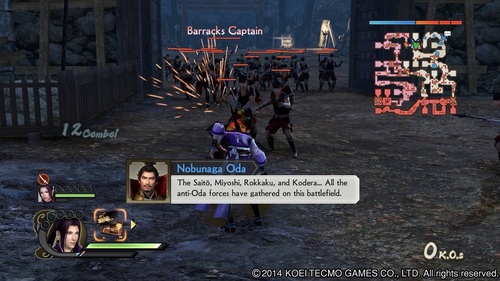
After making your choices, you are thrown onto the map in a form that is very similar to previous games. Samurai Warriors 4 offers far more mobility on the battlefield than previous games, as well as changing up the control scheme considerably. In previous iterations, your controls were limited to random interspersions of your strong attack within a long string of your weak, spammable attack, with sporadic uses of your Musou ability so you could empty the gauge for refilling. Here in SW4, your typical strong attack button is instead replaced with a Hyper Attack. This functions much the same way as your previous weak attack, with your other button acting as your new strong attack (Square, Square, Square, Triangle is one type of combo, while Triangle, Triangle, Triangle, Square does a different type of combo). Further, Hyper Attack usually involves dashing forward a short distance while attacking, which is ideal for jumping between groups of cannon fodder a la the above picture. Where Hyper Attack fails, however, is against enemy commanders. In true weak attack form, commanders automatically repel Hyper Attacks, making you switch back to your normal button hammering. However, like how Hyper Attack changed combos, there's a chance while beating on an enemy commander to proc the ability to deal considerably more damage. If you hit a certain button at the right time - usually right after a certain combo chain - your character can go through a very fancy attack flourish that has the potential to take half or more of the target's health.
Previously I mentioned primary and secondary characters. Well, while in battle, you can hit the Options button and switch between the two characters interchangeably. It's a system that unfortunately was not very well explained, but if used properly, you can effectively be in two places at once on the battlefield, allowing you to control the flow far more efficiently than some previous games - though not quite as well as some Dynasty Warriors iterations where you can issue orders to every commander on the field.
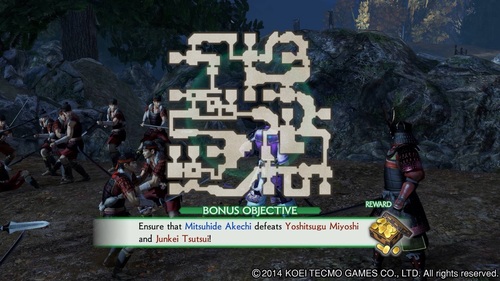
In the course of your battles, you may be given bonus objectives. They may require you to defeat enemy commanders with certain allied commanders, or to defeat them with a certain combo count. The objectives vary, but they are a good source of income and items early on, which makes them worth seeking out and completing. My only complaint about objectives and bonus objectives is that they appear to happen very frequently, and each one of them pulls you out of the combat and shows you a screen like the one shown here. It gets somewhat tiresome, having so many breaks from combat, but it's a fairly minor complaint - and possibly one that is solved through going into Chronicle Mode over Story Mode.
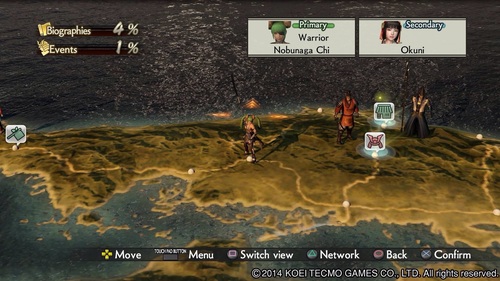
Lastly, we have Free Mode. After choosing your created character, you are allowed to choose a region in Japan. This region is where you begin your Free Campaign. There's no real story, and you are free to play however you like. At intervals, you have interactions with fellow commanders that you've encountered and swayed to your side, and your choices in these interactions can increase your relationship level with them - previous games have had a similar system, though it seems to be far more obvious this time around. Each node on the map screen above counts as a different location, and each move counts as a day; after your move, the other models on the map have a move of their own, so you can encounter them on a node randomly after moving. Meeting them on a map either takes you to the shop screen - in the case of traveling merchants - or to a battlefield screen with randomly generated objectives. It's a mode in which each playthrough can return vastly different results, so it's always an exciting mode to play through. I have yet to complete a game so I'm not entirely sure what happens when you complete it - or even if there is a completion to it - but it's quite an engaging way to pass the time.
My Verdict: despite being very similar to many other games in the Warriors franchise, Samurai Warriors 4 is a very solid interpretation, with enough changes to make it feel very fresh. I would definitely recommend this game, even over Warriors Orochi 3. Being a seasooned veteran of Dynasty Warriors, Samurai Warriors gives a refreshingly different area of history to explore, one that I am very interested in learning more about.


![Screenshot_2014-11-02-11-54-44[1].png](http://static.squarespace.com/static/50bea065e4b066c23fcf5491/t/545d4af5e4b03a44d11393bc/1415400216022/Screenshot_2014-11-02-11-54-44%5B1%5D.png?format=500w)