This Working Droid Episode 51 Swype

Direct Download

E-Mail Me or use our online conatct form!

Support Geek I/O on Patreon!

HeadphonesNeil Amazon Author Profile

Episode Guide

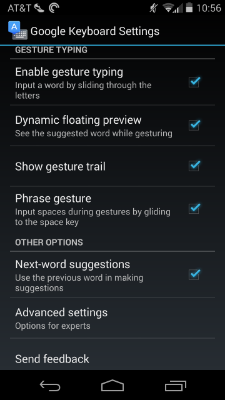
  • Type on your smartphone without lifting your finger
  • Predicts words as they are typed
  • Figures words out if possible to easily continue typing
  • Wikipedia
  • How to use
    • Built into Android Jelly Bean (or install 3rd party keyboards like Swype or Swiftkey for older Android versions)
    • Swiftkey on iOS

Sponsor - ProXPN

  • Safely and securely browse the web
  • Keep your data protected
  • Access location sensitive contact like Netflix
  • Visit http://proxpn.com and use promo code 'GEEK20' for 20% off your order!
Simply use my Amazon link when shopping to support my content!

The Android Realm App Review Pedometer

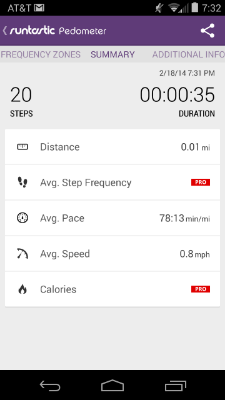
If you're like me, you like Google Now's monthly walking summary. The only thing missing is a regular count for how many footsteps or how many miles I walk daily or monthly. That is where the Pedometer app does its magic.

After installing the app, the user is given the choice to login with Google+, Facebook, or e-mail. Once the account is setup, getting your distance walked (or run for that matter) is simply a matter of starting the workout. The main screen keeps track of the number of steps walked, duration, approximate speed, etc. The app continues to run in the background with minimal resource usage (which may vary by device). Once the workout is stopped, the user can rate how they felt, the kind of surface, weather, etc. to keep track of changing conditions if desired.

The app does have various configurable settings like the size of the user's footsteps to adjust by stride or height, adjusting what the app should consider a normal, fast, or slow walking speed and the ability to adjust how the app interacts with the screen timeout. The final feature of the app is the ability to have it play music once the workout is started if the user wants something to keep them going. This feature defaults to the user's default music app (i.e. Google Play Music).

Accuracy of the app will most likely vary based on the sensors available on the user's device along with how new or old the device is as well. Newer devices should be more accurate/reliable with older devices being generally accurate but not necessarily spot on.

The app itself is free with a paid version unlocking more features like weather.

Google Play - $Free

Android 2.2+

Downunder Colorado 49 - Coming Out of the Master Beta Phase

Coming up - We finally have a guest co-host and he is here to geek out, 5 tech toys at Toy Fair 2014 that spark imagination, Google releases tips on Google Glass etiquette, Studio Behind Take-Two's 'BioShock' to Wind Down, being stuck with 30000 tons of curry and more on this episode of Downunder Colorado!

Joining us this week - Our first guest in duco history, Boss man of The Geek I/O podcast network, infamous comic and disney geek and host of The Geek I/O Show and all round awesome guy...Mr CJ Boat

Topics:

5 tech toys at Toy Fair 2014 that spark imagination http://www.foxnews.com/tech/2014/02/18/5-tech-toys-at-toy-fair-2014-that-spark-imagination/

Google releases tips on Google Glass etiquette http://www.bizreport.com/2014/02/google-releases-tips-on-google-glass-etiquette.html

Studio Behind Take-Two's 'BioShock' to Wind Down  http://www.marketwatch.com/story/take-twos-irrational-games-unit-to-wind-down-studio-2014-02-18-164494352

Where you can find the show:

If you have any questions, topics, feedback, complaints, or anything at all, send your emails to [email protected] or comment to our Twitter at twitter.com/DuCoShow.

All of our episodes (complete with FULL shownotes) are over at chefwonder.squarespace.com/ducoshow where you can subscribe to the podcast. You will be notified automatically when a new show comes out.

As always, you can give us a call at (719) 445-6696 (US only), +617 310 325 28 (Aussies only) or skype dale at chefwonder if you anything cool to add!

Downunder Colorado are proud members of the Geek IO and Chefwonder Podcast networks. We can be found on the Geek IO masterfeed, which can be found over at geek-io.com and Chefwonder can be found at chefwonder.squarespace.com

Were now on iTunes! Be sure to subscribe and if you like the show (or not), please leave a review and we will read it on the show!

Also, We broadcast live on YouTube at youtube.com/chefwonderdc. We record live Tuesdays where you can ask us live questions either via G+ or IRC.

Where you can find us:

Dale: twitter.com/TheDaleCampbell

Doug:  twitter.com/Revenar_AIE

Zay: twitter.com/inkedzay

How It Stacks #19 - Crocodile Dundee I & II

Croc-Dundee1.jpg

"Heh. Thats not a knife... this, is a knife!"

In this gloriously down-under episode, the How It Stacks crew sneak up on both Crocodile Dundee 1 and 2. They  start off with a glorious versus battle royal, in which they pit Dundee against John McClane, then against Snake Plisken. JD shares his worship of Crocodile Dundee and acknowledges how very pimp he was and is still. Bulldog believes that Dundee missed his calling as a wrestler. Professor Willis keeps the fact bombs coming. Bulldog and Professor Willis makes some awesome points during a Terminator and Dundee debate. Finally this show gets crazy as they dive right back into the 80s and make some awesome jokes about the massive stereotypes the 80s brought us!

You dont want to miss this one it goes for yonks!!

Pace Picante (not Tostitos, oops) - Twitter Bot = Fail


Special thanks to Anamanaguchi and Frank Turner for our music and to The Geek I/O Podcast Network for hosting our show!

Geek I/O is currently taking a survey of all their listeners. Please click the banner in the show post via the website (www.geek-io.com/howitstacks) or the picture/link below. This is a brief survey to help us get to know you and what you like about our shows! They have also started a new way to support the network: monthly subscriptions, starting as low as $1/month! Currently this is a way for the network to improve the website and get new equipment, and help pay for miscellaneous network expenses. But if we start receiving enough sponsors there is a possibility to go ad free! Visit the Patreon site for full details, and to sign up!

ShortSurvey.jpg

Short Survey

FullSurvey.jpg

Full Survey

Sponsors:

Tweaked Audio (www.TweakedAudio.com): use the code "geek" to receive free shipping and 33% off your order!

ProXPN (www.ProXPN.com): use the code "geek20" to receive 20% off your membership (normally $6.25/month).

This Working Droid Episode 50 Clear App Data

Direct Download

E-Mail me or fill out our online contact form!

Support Geek I/O on Patreon!

HeadphonesNeil Amazon Author Profile

Episode Guide

  • Free up smartphone storage
  • Improve performance of app on device
  • Use Clear Data to do a reset of app on device
  • Android
    • Settings > Apps
    • Optional: Sort by size (makes it easier to find the culprits)
    • Select app
    • Select Clear Cache
    • Select Clear Data to do a soft reset of the app (clears login info so user will have to log back into app and reset preferences)
  • iOS / Windows Phone
    • Check app settings to clear app data or adjust how much storage the app can use (*if available)
    • Uninstall then Reinstall app
    • Find 3rd party apps to manage app cache

Sponsor - ProXPN

  • Browse the internet safely and securely
  • Keep personal data protected
  • Access location sensitive contact
  • Visit http://proxpn.com and use promo code 'GEEK20' to get 20% off your order!
Simply use my Amazon link when shopping to support my content!