The meaning of L, TV is improved, become a tycoon of fun and more!
Support Geek I/O on Patreon!
HeadphonesNeil Amazon Author Profile
[Sponsor - TweakedAudio] Use promo code 'geek' at checkout to get 1/3 off your brand new noise reducing headphones!
The meaning of L, TV is improved, become a tycoon of fun and more!
Support Geek I/O on Patreon!
HeadphonesNeil Amazon Author Profile
[Sponsor - TweakedAudio] Use promo code 'geek' at checkout to get 1/3 off your brand new noise reducing headphones!
More HTC, installing on other platforms, and more!
Episode Guide
Support Geek I/O on Patreon!
HeadphonesNeil Amazon Author Profile
[Sponsor - TweakedAudio] Use promo code 'geek' at checkout to get 1/3 off your brand new noise reducing headphones!
In the search for a new and exciting home screen launcher, I recently came across one that not only brings HTC's Blinkfeed style launcher to non-HTC devices but includes notification support and some Material Design thrown in. The launcher is called Flow Home and is a launcher that takes Blink Feed but adds a quick launch icon in the style of Google+ and quick access to your full app drawer.
While the launcher is currently in Beta and requires a code to use, once the code is entered, getting the app up and running is just as easy as signing up and into a new app. The first time setup wizard will start once the code is entered. Currently 3 social networks are supported: Facebook, Twitter and Instagram. Whichever network is desired can be logged into here or skipped and added later via settings. Twitter and Instagram populated quickly for me with Facebook taking a little longer and slowly adding in my News Feed. The default refresh rate once accounts are added is 30 minutes but can be adjusted to refresh more quickly or slow as desired. The app can also read notifications which show up in the homescreen feed to directly and quickly access. This works nicely for Google+ since it doesn't currently have any APIs for 3rd party app developers to use.
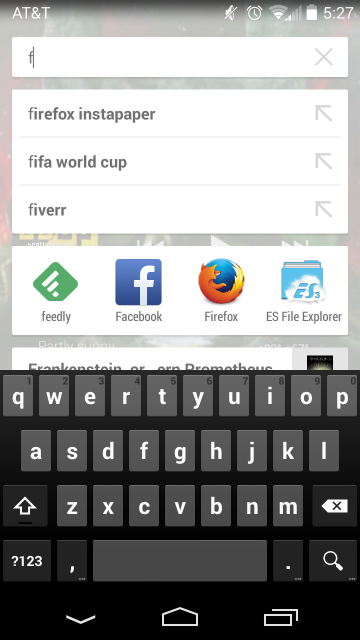
The button with the transparent cube at the bottom right of the screen has two options. Quick pressing the button will open app shortcuts which can be customized with up to three rows of app shortcuts. This is reminiscent of Circle Launcher or Pie Control style apps of app shortcuts to provide a simple reference. Adding apps is a simple as long pressing on the app from the full app drawer and selecting add shortcut. The settings menu has the option to place the button on the bottom left or right of the screen based on user preference. The second option for this button is searching for apps to open. This is done by long pressing on the button to start typing which starts a real time search for installed apps on the device that match the search string. Pressing the red x to close the search will default to the app drawer.
The easiest and most direct way of getting to the app drawer is to swype left from the main screen. This will also change the transparent cube to a search button to allow searching for apps (so essentially the reverse method of the steps listed above). Swyping right will take the user back to the home screen.
Other customization options include the ability to set a custom image for the settings button at the top of the screen (below the notification drawer) and setting a custom banner image that sits behind the date and weather which sit at the top of the screen. Finally, if the user wants to remove items from the feed, swping right on the card will "delete" it.
The only issue I have with the launcher at the moment is the respective default apps not loading the post when clicked though the browser version does work so setting your preferred default browser may be the way to go at the moment. This isn't a deal breaker though since there is the beta tag but I do imagine this will be more streamlined in future releases.
Skipping numbers because of digits, fast forwarding through time, and more!
Episode Guide
Support Geek I/O on Patreon!
HeadphonesNeil Amazon Author Profile
[Sponsor - TweakedAudio] Use promo code 'geek' to get 1/3 off your brand new noise reducing headphones today!
With all the talk about time lapse features, for this review, I wanted to share just one of many time lapse apps in the Google Play store that is not only stored to the user's device but can be shared to just about anywhere and has a full range of features.
To start, videos can be created just by pushing the record button like any other video. Current settings show up at the top right of the screen to provide quick stats for the output for the video. Many of these settings can be changed and are separated by type. To start, video resolution can be adjusted based on device hardware but can range from 1080p to 480p. Next, the frame interval can be adjusted from 0.1 seconds up to 60 second intervals. The PRO version allows for custom intervals that can be different from the options provided. From here, the video length can be set based on how long the user wants their video to be. There is no limit in the free version but the PRO version does allow setting custom lengths outside of the options that the free version provides. Other settings include white balance, auto focus, FX, and exposure.
A quick overview for at least how this app creates its time lapse is that the 0.1 time interval is closest to a standard length time lapse. Any interval greater than this requires that much longer of the a video to create the time lapse effect. The video in the post was created used this time interval with all other settings at default.
The video render is done in real time so once the recording is stopped, the video is saved to the user's device. Since the video is saved in mp4 format, it can be shared to most sites including but not limited to Facebook, Instagram, Google+ and YouTube.
Most of the apps features are available in the free version including setting time intervals, no limit on video resolution or length, and adjusting filter types. The PRO version adds the ability to make custom adjustments and unlocks various video adjustment features.
Getting flight prices, more Star Wars, floating windows, and more!
Support Geek I/O on Patreon!
HeadphonesNeil Amazon Author Profile
[Sponsor - TweakedAudio] Use promo code 'geek' at checkout to get 1/3 off your brand new noise reducing headphones today!
Support Geek I/O on Patreon!
HeadphonesNeil Amazon Author Profile
[Sponsor - TweakedAudio] Use promo code 'geek' to get 1/3 off your brand new noise reducing headphones today!
On a planet where there’s Windows on Android and iOS pulls a Samsung!
Episode Guide
Support Geek I/O on Patreon!
HeadphonesNeil Amazon Author Profile
[Sponsor - Puget] Visit http://geek-io.com/puget to get started on your custom computer today!
If you use Amazon Instant Video on Kindle, wished it was available on Android, or want another video streaming option, then everyone is in for a nice surprise. As long as the Amazon app is installed, users should be getting an update to the app letting users install the Instant Video app to browse, buy and watch videos from Amazon's library.
To clarify, in order to install and use the Instant Video app, the Amazon app needs to be installed in order to access the download link. Upon installation, a link will be added to the app drawer to directly go to the Amazon Video library.
As far as prior purchases, any videos purchased with the associated account will show up. The app supports Amazon Prime as well so related benefits should carry over.
Much like the website, the app supports buying HD and SD content (and entire seasons) and adding to your wishlist so everything should sync with your account.
The only downside to the app is no offline video which is expected since other non-Kindle releases of the app work in the same way.
Overall, the app is pretty straightforward, especially if the user has used the Amazon app before and now provides more devices to access Amazon's video library.
More Angry Birds, faster devices, personal website and more!
Voicemail - (714)451-6574
HeadphonesNeil Amazon Author Profile
[Sponsor - TweakedAudio] Use promo code 'geek' to get 1/3 off your brand new noise reducing headphones today!
More drones, apps on different screens, tab switching and more!
Support Geek I/O on Patreon!
HeadphonesNeil Amazon Author Profile
[Sponsor - TweakedAudio] Use promo code 'geek' at checkout to get 1/3 off your brand new headphones today!
Extending Google Now, avoiding hammers, screenshots and more!
Episode Guide
Support Geek I/O on Patreon!
Did you play Flappy Bird and found it too tough? When you saw the screenshots or heard the stories, did you avoid the game? Well, the new game released by Gear Studios may be more interesting and play worthy. The game is called Swing Copters and it brings the Flappy Bird gameplay back with a twist.
The idea behind this game is to guide your character vertically through rafters. Unlike Flappy Bird, where there were no obstacles, Swing Copters has swinging hammers that hang from the rafters that will end the game if the character hits them. Hitting the rafters or the hammers destroys the helicopter helmet immediately so finesse is key. The other change (and challenge) to the game is the helicopter helmet which adds a speed element that makes the game more fun and challenging.
Playing the game is very straightforward. Tapping your screen controls the character by changing its direction either left or right. Tapping too fast or not tapping at all though will increase your speed in either direction which can make it difficult to correct course and continue playing.
Since this game does require finesse, it actually makes the game very tough so be prepared to have low scores initially but it is fun nevertheless.
Tapping around, swyping vertically, integrating functions, and more!
Episode Guide
Support Geek I/O on Patreon!
HeadphonesNeil Amazon Author Profile
[Sponsor - TweakedAudio] Use promo code 'geek' to get 1/3 off your brand new noise reducing headphones today!
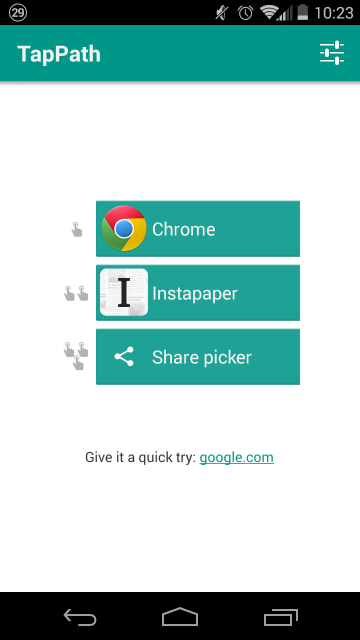
Do you like Android's share menu but wish it was more customizable? Want a quicker way to be able to access and share links that suits your needs? That's where TapPath comes in.
TapPath is a new app from the developer of Action Launcher and Link Bubble that let's users customize what single, double and triple tapping links does. For example, the user can set the app to launch a browser with a single tap, share to Facebook with a double tap and share to Instapaper with a triple tap. The options for specific actions can be changed to suit the user's needs so features like the default share menu can still be accessed and other apps can be launched with the taps. The only other setting is the ability to change the tap sensitivity so if the user finds that they can't get to the double or triple tap fast enough or need faster access to the taps, then that can be adjusted. A lower value means faster single tap detection and a higher value for slows single tap detection. I have it set to the highest value to ensure the right number of taps is detected most often but that can vary by user and device.
The only prerequisite to ensure correct app performance is that it has to be set as the default browser. That way it is registered when any number of taps are pressed.
Right now the app is in initial release and seems to work pretty well. The only trouble I have is with triple clicks but it seems to be a matter of adjusting the tap sensitivity (my initial adjustment mostly fixed the tapping issues so the sensitivity may be device specific). The app is worth checking out though, especially if you want an easy and quick way to share links and not have to worry about finding the share menu in every installed app.
Episode Guide
Support Geek I/O on Patreon!
HeadphonesNeil Amazon Author Profile
[Sponsor - TweakedAudio] Use promo code 'geek' to get 1/3 off your brand new noise reducing headphones today!
*If you're on an older version of Android, be sure to check out Action Launcher (for Android 4.0.3+) for similar functionality.
Episode Guide
Support Geek I/O on Patreon!
HeadphonesNeil Amazon Author Profile
[Sponsor - TweakedAudio] Use promo code 'geek' at checkout to get 1/3 off your brand new headphones today!
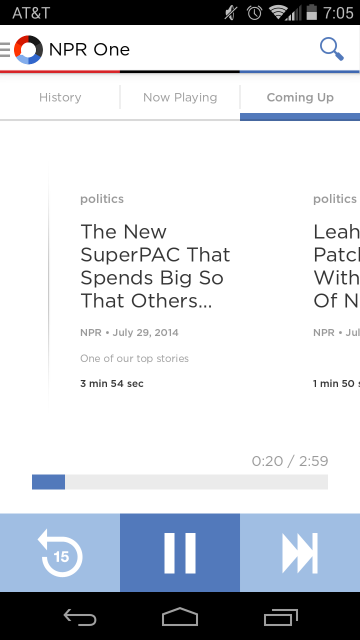
If you're like me, sometimes you want a simple news show that provides the latest news with minimal commercials. Additionally, I want news that is more current and relevant than what I see on TV.
That is where the NPR One app comes in to play. It provides hourly news updates along with engaging stories and local content all merged based on your location. Local content can be customized but that is about all the work that needs to be done. The app stores a few of the articles on your device for offline listening so the latest episodes can be heard in the go. They can get rated as interesting which I figure factors into future similarly styled news episodes. Also, there are no commercials in the traditional sense. Rather, every so often they provide a reminder that NPR is a free and public service that runs on donations so those are always welcome.
Overall the app is lightweight and easy to use and worth trying out for regular news on the go. The only thing I can't tell is if it downloads audio on WiFi and mobile or just one so I'm a bit wary still unless a toggle is added. This would probably be the only change/addition I would make to an otherwise great app.
Better mousing, consistency updates, a new wallet app and more!
Support Geek I/O on Patreon!
HeadphonesNeil Amazon Author Profile
[Sponsor - TweakedAudio] Use promo code 'geek' to get 1/3 off your brand new headphones today!
![Screenshot_2014-10-02-20-30-43[1].png](https://images.squarespace-cdn.com/content/v1/50bea065e4b066c23fcf5491/1412371701903-5BCYHCIHE8PFI4HCWS11/Screenshot_2014-10-02-20-30-43%5B1%5D.png)